
Introduction
If you spend most of your day clicking, scrolling and dragging windows around — whether you are grinding through spreadsheets or grinding through ranked matches — the mouse in your hand matters more than most people admit. A cheap, laggy or uncomfortable mouse does not just slow you down; over months of daily use it can genuinely wear out your wrist and hand.
The wireless mouse market in 2026 is packed with options, from ultra-light gaming mice built for split-speed reactions to ergonomic productivity mice designed to survive an 8-hour workday. To save you the research, we have broken down five standout wireless mice, one for nearly every kind of user — office workers, hybrid gamers, ergonomics-first buyers and people who just want something small enough to toss in a bag.
Why a Good Wireless Mouse Actually Matters
Before jumping into the picks, it helps to understand what actually separates a great wireless mouse from a mediocre one:
No more cable clutter. A clean desk is not just aesthetic — it is one less thing catching on your keyboard mid-task.
Freedom of movement. Wireless mice let you sit further back, use a mouse on your lap or work from a couch without a leash to your laptop.
Fewer repetitive strain issues. A mouse shaped for your grip style reduces the micro-strain that builds up over thousands of clicks a day.
Multi-device flexibility. Many modern wireless mice let you jump between a laptop, desktop and tablet with one click.
Battery life that does not interrupt you. The best models now last weeks — sometimes months — on a single charge or battery.
No more cable clutter. A clean desk is not just aesthetic — it is one less thing catching on your keyboard mid-task.
Freedom of movement. Wireless mice let you sit further back, use a mouse on your lap or work from a couch without a leash to your laptop.
Fewer repetitive strain issues. A mouse shaped for your grip style reduces the micro-strain that builds up over thousands of clicks a day.
Multi-device flexibility. Many modern wireless mice let you jump between a laptop, desktop and tablet with one click.
Battery life that does not interrupt you. The best models now last weeks — sometimes months — on a single charge or battery.
How We Picked These Mice
For this guide, we focused on the criteria that actually affect day-to-day use: build quality and ergonomics, sensor accuracy and responsiveness, battery life, connectivity options (Bluetooth vs. 2.4GHz dongle) and overall value for money. We also made sure to include a healthy mix — not just gaming mice and not just office mice — because most people today switch between work tasks and casual gaming on the same machine.
Top 5 Best Wireless Mice in 2026
1. Logitech MX Master 3S — Best Overall for Work
The Problem It Solves: If you are juggling multiple monitors, apps and even multiple computers throughout the day, a basic two-button mouse just can not keep up with your workflow.
How It Solves It: The MX Master 3S is built specifically for power users who live inside their workflow.
Its electromagnetic scroll wheel switches between a smooth free-spin mode and a notched precision mode, so you can blast through a long document and then fine-tune a spreadsheet without touching a setting.
A secondary thumb wheel handles horizontal scrolling and zoom and the mouse can pair with up to three devices at once, letting you flick your cursor across a laptop, desktop and tablet seamlessly.
Key Features:
Electromagnetic scroll wheel (smooth or ratcheted)
Up to 6 customizable buttons plus a side scroll wheel
Connects to 3 devices with seamless switching
Long battery life with fast USB-C charging
Its electromagnetic scroll wheel switches between a smooth free-spin mode and a notched precision mode, so you can blast through a long document and then fine-tune a spreadsheet without touching a setting.
A secondary thumb wheel handles horizontal scrolling and zoom and the mouse can pair with up to three devices at once, letting you flick your cursor across a laptop, desktop and tablet seamlessly.
Electromagnetic scroll wheel (smooth or ratcheted)
Up to 6 customizable buttons plus a side scroll wheel
Connects to 3 devices with seamless switching
Long battery life with fast USB-C charging
2. Razer Viper V3 Pro — Best for Competitive Gaming
The Problem It Solves: Wired gaming mice are fast, but the cable can catch mid-swipe during intense moments — costing you the exact flick-shot you needed.
How It Solves It: The Viper V3 Pro is built to remove wireless lag from the equation entirely. With a high-speed wireless connection tuned for esports-level responsiveness, an ultra-lightweight shell and a sensor built for precise, fast tracking, it is designed so you genuinely can not tell it is not wired.
Key Features:
Ultra-lightweight ambidextrous shell
High polling rate for competitive-grade responsiveness
Long battery life even with wireless performance mode on
Optical switches built for durability under rapid clicking
Ultra-lightweight ambidextrous shell
High polling rate for competitive-grade responsiveness
Long battery life even with wireless performance mode on
Optical switches built for durability under rapid clicking
3. Logitech G305 LIGHTSPEED — Best Budget Gaming Mouse
The Problem It Solves: Not everyone wants to spend premium money on a gaming mouse, especially if gaming is a secondary use case alongside work.
How It Solves It: The G305 proves you don't need a triple-digit price tag to get a genuinely capable wireless gaming mouse. It uses Logitech's LIGHTSPEED wireless technology to deliver a fast, stable connection, all while running on a single AA battery for months at a time.
Key Features:
LIGHTSPEED wireless with low latency
Lightweight shell for quick, fatigue-free movement
Extremely long battery life on one AA battery
Onboard memory for custom DPI and button profiles
LIGHTSPEED wireless with low latency
Lightweight shell for quick, fatigue-free movement
Extremely long battery life on one AA battery
Onboard memory for custom DPI and button profiles
4. Logitech Lift — Best Ergonomic Mouse
The Problem It Solves: Traditional flat mice force your forearm into an unnatural rotation for hours a day, which is a common contributor to wrist and forearm strain.
How It Solves It: The Lift uses a vertical grip design that angles your hand into a more natural handshake position, taking pressure off the wrist. It is built with smaller and medium-sized hands in mind and — unlike most ergonomic mice — it is actually available in a left-handed version too.
Key Features:
Vertical, ergonomic hand-angle design
Available in right-handed and left-handed versions
Quiet click switches
Per-app profiles and multi-device flow support
3 Benefits:
Genuinely reduces wrist strain for people who type/click all day
Rare left-handed option most ergonomic mice skip entirely
Quiet clicks make it office and shared-space friendly
Vertical, ergonomic hand-angle design
Available in right-handed and left-handed versions
Quiet click switches
Per-app profiles and multi-device flow support
Genuinely reduces wrist strain for people who type/click all day
Rare left-handed option most ergonomic mice skip entirely
Quiet clicks make it office and shared-space friendly
5. Logitech Pebble Mouse 2 M350s — Best for Travel & Portability
The Problem It Solves: Bulky mice are annoying to carry and most portable mice sacrifice comfort or button count to get small.
How It Solves It: The Pebble Mouse 2 keeps a slim, low-profile shape that slides easily into any laptop bag while still offering silent clicks and reliable Bluetooth or USB receiver connectivity — a genuinely comfortable daily-carry option, not just an emergency backup mouse.
Key Features:
Slim, lightweight, travel-friendly shape
Silent click technology
Dual connectivity: Bluetooth and USB receiver
Long battery life from a single replaceable battery
Slim, lightweight, travel-friendly shape
Silent click technology
Dual connectivity: Bluetooth and USB receiver
Long battery life from a single replaceable battery
Quick Comparison Table
Pricing, Value & Best Time to Buy
Wireless mice in this guide span a wide range — from budget-friendly gaming picks under the price of a nice dinner, to premium productivity mice that cost more but pay for themselves in daily comfort and workflow speed. If you are not in a rush, prices on most of these models dip noticeably around major shopping seasons (year-end sales, back-to-school and mid-year tech sales), so it is worth checking current deals before buying at full price.
Pros & Cons at a Glance
Pros of Upgrading to a Modern Wireless Mouse
Noticeably less desk clutter
Better ergonomics than most stock mice bundled with PCs
Multi-device switching saves real time throughout the day
Long battery life means far less charging anxiety than older wireless mice
Noticeably less desk clutter
Better ergonomics than most stock mice bundled with PCs
Multi-device switching saves real time throughout the day
Long battery life means far less charging anxiety than older wireless mice
Cons to Keep in Mind
Premium ergonomic and productivity mice cost more upfront
Some ergonomic shapes take a few days to adjust to
A few models rely on AA/AAA batteries instead of rechargeable cells
Premium ergonomic and productivity mice cost more upfront
Some ergonomic shapes take a few days to adjust to
A few models rely on AA/AAA batteries instead of rechargeable cells
Final Verdict
There is no single best wireless mouse for everyone — it comes down to what you actually do at your desk. If your day is full of documents, tabs and switching between devices, the Logitech MX Master 3S is the smartest all-around investment.
If competitive gaming is the priority, the Razer Viper V3 Pro delivers wired-level performance without the cable.
Budget-conscious gamers should look at the Logitech G305 LIGHTSPEED, while anyone dealing with wrist discomfort should seriously consider the Logitech Lift.
And if portability is king, the Logitech Pebble Mouse 2 M350s slides right into your bag without slowing you down.
Whichever you choose, upgrading from a basic bundled mouse to any of these five is one of the cheapest, highest-impact upgrades you can make to your daily setup.
RECOMMEND BEST WIRELESS MOUSE
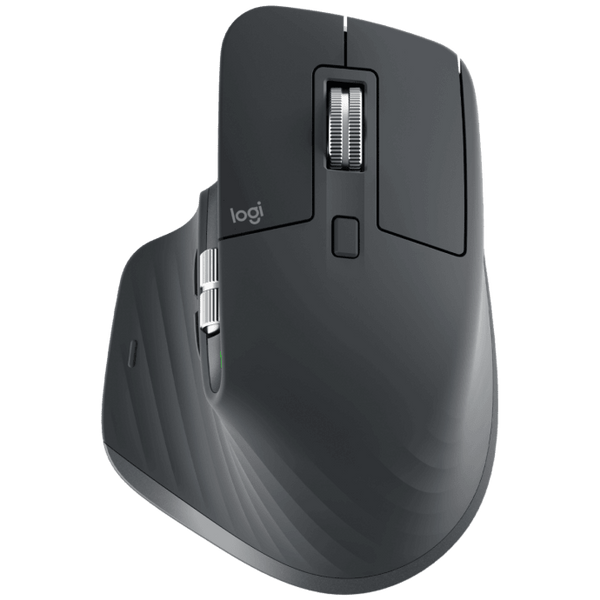
Logitech MX Master 3S Wireless Mouse
The ultimate multi-device productivity mouse with customizable buttons, quiet clicks and electromagnetic scrolling.
3 Benefits:
Cuts down repetitive app-switching with cross-device flow
Ergonomic, sculpted shape reduces wrist fatigue during long sessions
Extremely customizable via software for per-app button profiles

Razer Viper V3 Pro
Esports-grade wireless performance with an ultra-lightweight design and near-zero input lag for competitive gaming.
3 Benefits:
Near-zero perceptible input lag compared to wired mice
Featherweight design reduces arm fatigue during long gaming sessions
Durable switches built to survive heavy click volume over years

Logitech G305 LIGHTSPEED
Gaming-grade wireless performance with long-lasting battery efficiency built for budget-conscious gamers.
3 Benefits:
Gaming-grade responsiveness at a fraction of flagship prices
Set-and-forget battery life — charge anxiety is not a thing here
Simple, ambidextrous shape works for most grip styles

Logitech Pebble Mouse 2 M350s
Slim, silent-click and ultra-portable wireless mouse built for remote work, travel and life on the go.
3 Benefits:
Fits easily into any bag without adding noticeable weight
Silent clicks make it ideal for cafes, libraries and shared offices
Flexible connectivity means it works with almost any laptop setup
Logitech Pebble Mouse 2 M350s
Slim, silent-click and ultra-portable wireless mouse built for remote work, travel and life on the go.
3 Benefits:
Genuinely reduces wrist strain for people who type/click all day
Rare left-handed option most ergonomic mice skip entirely
Quiet clicks make it office and shared-space friendly
Frequently Asked Questions
Modern high-end wireless gaming mice, like the Razer Viper V3 Pro, use high-speed wireless technology that performs on par with wired mice for the vast majority of players, including competitive gamers.
It depends on the model. Rechargeable mice like the MX Master 3S typically last several weeks per charge, while AA/AAA-powered mice like the G305 can run for months on a single battery.
Yes — ergonomic mice like the Logitech Lift are worth considering preventatively, especially if you spend more than a few hours a day on a computer, since strain tends to build up gradually.
Bluetooth is more convenient for multi-device use and travel, while a USB receiver (like Logitech's) typically offers slightly lower latency — better for gaming or precision work.